



Google is working on new features for Android Auto, and it includes the introduction of more widgets to the home screen. For weeks, we have been waiting for the video apps widget, but it seems not to be ready yet. However, the Android Auto 16.7 beta build has introduced new widgets for select apps. While the feature is not enabled by default yet, you can enable it using a launcher.
Most Android Auto updates that have arrived in the past weeks have focused on bug fixes and improvements. A recent update resolved the connection issues experienced by Samsung and Pixel phone users while introducing the YouTube audio playback feature. The new update also comes with these fixes and new additions for users yet to receive, and adds the much-anticipated widget.
Unfortunately, Google is still testing the custom widget feature, which is why it has not been enabled by default. According to a report, a new string from the Android Auto 16.7 beta update shows Google is working on a custom homescreen widget for Android Auto. Interestingly, it will be coming with more customizations; you will be able to adjust the size of the widget and place it anywhere on the Android Auto homescreen.
Currently, Google has hidden the Widget feature under EarthCompanion, and it can be accessed through the Android Auto settings. Meanwhile, you need an Activity Launcher or APK Analyzer to enable the new widget.
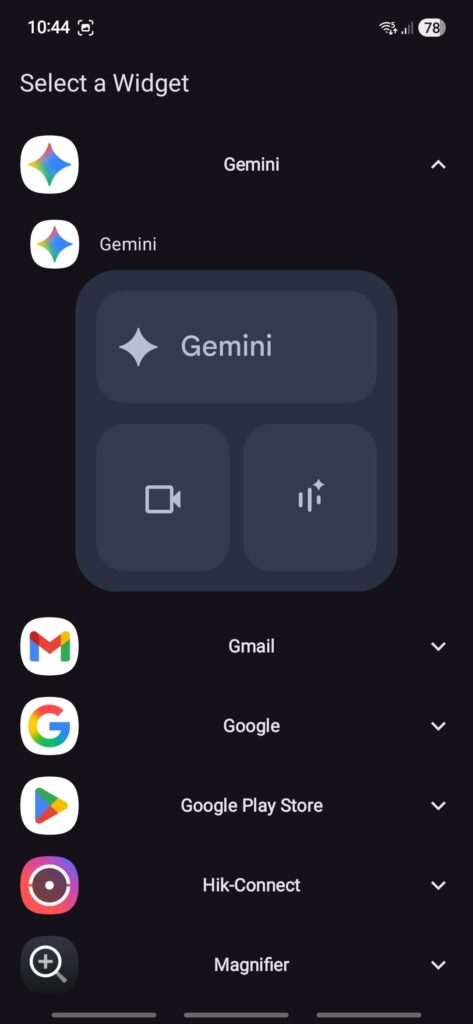
- Step 1. Download and install the Android Auto 16.7 Beta update.
- Step 2. Install either Activity Launcher or APK Analyzer.
- Step 3. Launch the Activity launcher and search for Android Auto. Inside the app, search for Earth. There are 3 activities: select Earth Companion.
- Step 4. Run the Earth Companion and select the + sign in the top right corner.
- Step 5. Select the App you want to add widgets for on the Android Auto home screen.
- Step 6. You will see available widgets, select them, and you can adjust the widget.
- Step 7. The Earth Host Activity will show you what the widgets look like.
Unfortunately, only Gemini can be selected when adding a new widget to the homescreen. It means that Google has still not released the video app widget it promised months ago. Meanwhile, there have been indications that the company is still developing the feature, and we anticipate a release in the coming weeks.
Aside from the widget additions, Google is making it easy to detect connection issues and troubleshoot easily. Android will now reconnect easily and show a notification if your device is connected wirelessly. A Wi-Fi notification text will also show for wireless reconnect or wireless turn-on.
With this update, Google is expanding Gemini to more users. The AI-powered assistance is replacing the traditional Google Assistant. If you have not received it yet, it is the right time to do so by installing the latest Android Auto 16.7 Beta update. And do not worry if you are not part of the beta program, you can install the APK file.
Download Android Auto 16.7 Beta update APK
Google has started rolling out a new update for Android Auto users. It is available via the Play Store, but only beta testers can install it via the app. Alternatively, you can download the APK file and install it. Visit this link to download the Android Auto 16.7 beta APK file. Locate the file in your device’s download folder, tap on it, and follow the screen prompt to complete the installation.
source: Androidsage
