



Xiaomi is still in the process of rolling out Android 16-based HyperOS 3, but the update has already caused serious issues for some users. Reports have surfaced confirming that the Redmi Note 13 Pro and POCO M6 Pro may fail to boot after installing HyperOS 3.
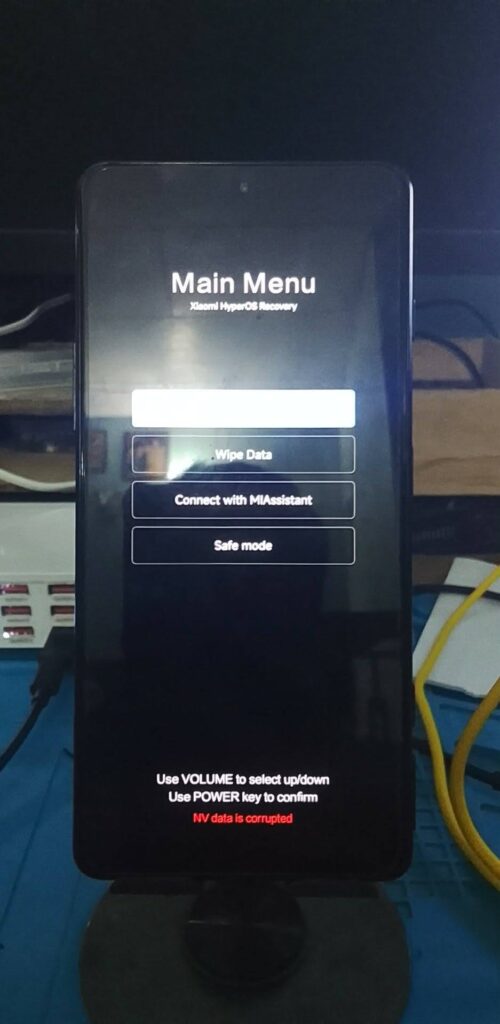
The problem started shortly after the update was released for these devices a few weeks ago. While HyperOS upgrades have previously caused minor issues, this situation is more severe and affects device usability entirely.
Why Redmi Note 13 Pro and POCO M6 Pro Are Not Booting
According to multiple reports, this is not a bug in the HyperOS 3 build itself. Instead, the issue affects devices running unauthorized or modified ROMs, commonly referred to as fake ROMs.
Since Xiaomi transitioned from MIUI to HyperOS, the company has tightened its security policies. Bootloader unlocking is now subject to stricter requirements, and HyperOS 3 introduces even more aggressive system verification checks during the boot process.
These changes have exposed devices that were:
- Originally sold with Chinese ROM
- Later flashed with Global ROM without proper bootloader unlocking
Who Is Affected by the HyperOS 3 Boot Issue?
The boot failure mainly affects:
- Redmi Note 13 Pro (China variant running Global ROM)
- POCO M6 Pro (China variant running Global ROM)
Although these phones are genuine Xiaomi products, they are meant to run Chinese firmware. Some third-party sellers install Global ROMs unofficially to make the devices more appealing to international buyers.
With the new security features in HyperOS 3, Xiaomi’s system now flags such installations as corrupted, preventing the device from completing the boot sequence.
How to Fix Redmi Note 13 Pro / POCO M6 Pro Not Booting
Unfortunately, Xiaomi has confirmed there will be no official fix for this issue.
However, affected users can try the following workaround:
Temporary Workaround
- Force restart the phone multiple times
- After several failed boot attempts, the system may automatically roll back to HyperOS 2.2
If the rollback is successful:
- Do not reinstall HyperOS 3
- Continue using your device on HyperOS 2.2, which remains stable
Updating again will most likely trigger the same boot loop.
How to Check If Your Device Is at Risk
You may be at risk if:
- You bought your phone from a non-official retailer
- The device was imported from China at a lower price
- Your phone has an unlocked bootloader
- The firmware region doesn’t match the original market version
How to Verify:
- Check MIUI/HyperOS region in Settings
- Look for bootloader unlock warnings
- Compare the device model number with official Xiaomi listings
Final Thoughts
HyperOS 3 brings tighter security, but it also exposes devices running unauthorized firmware configurations. If you’re using a Redmi Note 13 Pro or POCO M6 Pro with a modified Global ROM, installing HyperOS 3 is risky and not recommended.
For now, staying on HyperOS 2.2 is the safest option until Xiaomi changes its policy—which seems unlikely.
source: Xiaomi
