



Google has released a major Find My Device update, introducing a redesigned interface and powerful new features. The latest version now allows users to track people, Bluetooth devices, speakers, and item trackers—making it one of the most complete location tracking apps available today.
Google Find My Device Now Lets You Track People using your Android phone
The latest Google Find My Device app update adds a People tab, allowing users to share and track live locations—a feature that was previously exclusive to Google Maps. Interestingly, the new tracking system is still powered by Google Maps, as indicated by the Maps logo on the in-app map view.
With this update, you can easily track friends, family, or coworkers directly within Find My Device, without switching to another app.
Why Track People Using Find My Device Instead of Google Maps?
Google appears to be separating navigation and tracking functions between its apps. While Google Maps remains the best navigation tool, Find My Device is evolving into a dedicated location sharing and tracking app.
Here are a few reasons why tracking people with Find My Device is more convenient:
- The app has a cleaner, more organized interface focused solely on location tracking.
- It displays everyone you’re sharing your location with—and those sharing with you—at a glance.
- If someone has already shared their location via Google Maps, their contact automatically appears in your Find My Device app.
- This setup makes it easier to manage all your location-sharing connections in one place.
How to Track People Using Find My Device
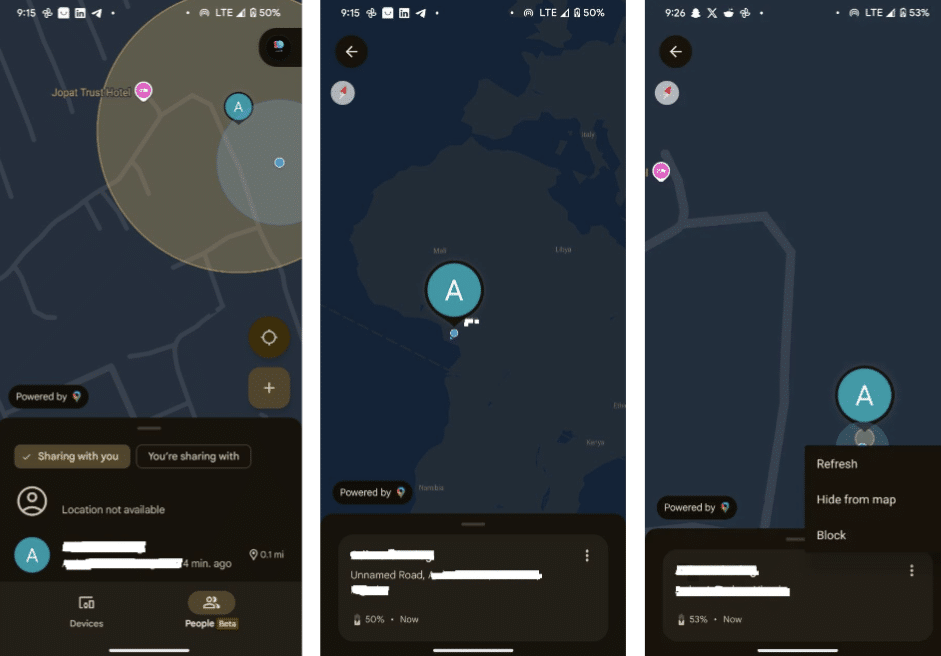
Here’s a step-by-step guide on how to track someone using Find My Device after installing the latest update:
- Update or download Find My Device from the Google Play Store.
- Open the app and go to the People tab.
- You’ll see a list of people who have shared their location with you.
- Tap on a contact to view their live location on the map.
- Select Get directions to navigate to their location.
- To hide or stop tracking someone, tap the three dots next to their name and choose Hide from map or Block.
Note: You can also view people’s locations on the Find My Device web version, but adding new contacts is currently limited to the mobile app—helping prevent unauthorized tracking.
Can Someone Track My Location Without My Knowledge?
Unfortunately, it’s possible for someone to track your location without your consent. Even if you turn off Location Services, spy apps or shared links from Google Maps or Find My Device can reveal your whereabouts.
To protect your privacy:
- Regularly review your location-sharing list in both Find My Device and Google Maps.
- Revoke access for any unknown or suspicious contacts.
- Check your phone for apps with unnecessary location permissions.
- Google also sends reminders about who you’re sharing your location with—so stay alert to avoid unwanted tracking.
Why You Should Still Share Your Location
While privacy is essential, location sharing can be lifesaving. Sharing your real-time location with trusted friends or family members can help them find you in emergencies or when you’re traveling.
With the new Google Find My Device update, Google has made it easier and safer to manage who sees your location—keeping your loved ones close while ensuring your privacy.
Key Takeaway
The Google Find My Device update transforms the app into a full-featured location tracking platform. You can now:
- Track people just like in Google Maps
- Locate Bluetooth devices, trackers, and speakers
- Manage all your location-sharing settings in one place
- Whether you want to keep tabs on your loved ones or find lost devices, the new Find My Device app is now your all-in-one solution for location tracking and device recovery.
