




WhatsApp has been rolling out new features to improve the app’s performance and enhance security. The company is slowing down as they move to make your phone number private with the release of the username feature. Soon, you won’t need someone’s phone number to message them on WhatsApp.
According to WABetaInfo, WhatsApp has released the username feature it’s been working on for months. As usual, the release is in phase, meaning only select users are receiving it. We understand that both Android and iOS users are getting the update. However, you can only set up a username for your account if you are one of the people selected for the beta program.
To check if the username feature on WhatsApp is available on your account, head to WhatsApp>>Settings>>Profile, and you will see a username field. You will likely see a pop-up as shown in the image below if you are an iOS user.
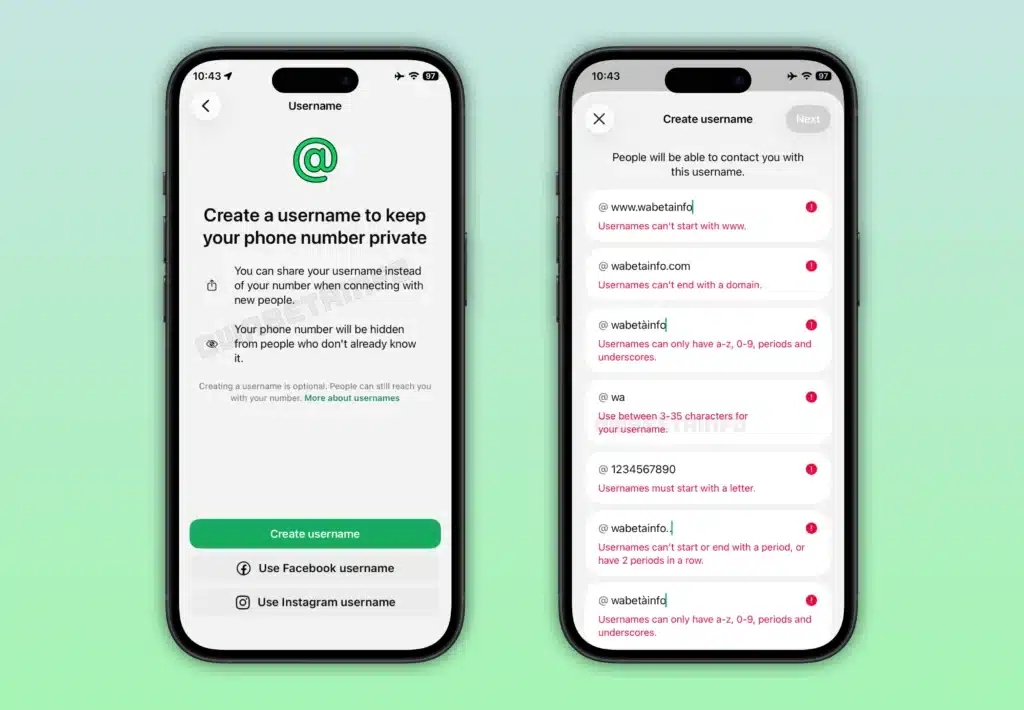
Details of the WhatsApp Username rollout and how it works
It’s unclear when WhatsApp will extend this feature to stable users. There is no ETA, but considering how the company releases new additions, we expect more people to start getting the username feature in the coming days. It might start from a few regions before expanding to all parts of the globe.
With a WhatsApp username, users can finally keep their phone number private. You will not have to give up your number before someone can chat with you on the app. However, you still need a phone number to continue using the app. Perhaps that will change once the username feature becomes widely available.
Also read: Download the Android Auto 16.6 stable update
For those seeing the username feature on their account, there are a few things you need to know when choosing a username.
- Usernames can be between 3-35 characters.
- Usernames can consist of lowercase letters, numbers, periods, and underscores
- No “www” or domain endings (.com, .net, etc)
- Usernames must include at least one letter character
Interesting, when you choose a WhatsApp username, you can link it to all your Meta apps. These include Facebook and Instagram. However, if the username matches any existing names on these other platforms, you won’t be able to use it on WhatsApp.
Additionally, WhatsApp will offer a “username key,” which is a 4-digit code required before you can send messages to a new username. However, it’s optional.
via: 9to5Google
